Category: آموزش

  • AI Penetration Testing with YasnaMCP: from reconnaissance to security report, from your own IP

    AI-driven penetration testing: ask in plain language, receive a professional report

    A penetration test usually means days of a specialist’s time, dozens of command-line tools and a report that arrives late. With YasnaMCP you tell the assistant “run a penetration test on example.com and report the open ports and vulnerabilities”. It runs well-known security tools step by step on your connector, explains the findings and finishes with a security report ready to hand over.

    Your request → AI assistant → YasnaMCP (authorisation + metering) → connector on your machine (your IP) → authorised target

    Penetration testing is only permitted on assets you own or have written permission to test. Scanning or attacking someone else’s systems without authorisation is a crime. YasnaMCP is built for security teams, network administrators and security service providers.

    Why from your own IP?

    Scans do not run on YasnaMCP’s servers; they run on your connector — the software you installed on your organisation’s Windows or Linux machine. That means:

    • Test traffic leaves from your own, known IP and fits your firewall rules and testing agreements.
    • Internal networks (for example 10.0.0.0/8) can be tested too, without opening any port to the outside.
    • For every request you choose which connector (which machine, which IP) tests which target. Your organisation is always identified from the access token, never from the request body.

    Three capability tiers, each its own permission

    Each tier is a separate scope, so an organisation gets exactly the level it is authorised for. The tiers escalate:

    1

    Identification and inventory — low risk

    Port and service scans with nmap, subdomain discovery with subfinder, web probing with httpx, plus DNS and whois. Strictly read-only: no payload is sent and nothing on the target changes.

    2

    Vulnerability assessment — medium risk

    nuclei templates, a full and more aggressive nmap scan of every port with version detection and scripts, and an assessment pass by the Strix agentic engine. Active, but rate-limited so the target is not overloaded.

    3

    Exploit validation — critical

    Proving that a confirmed vulnerability is exploitable, with Metasploit or Strix, against a single named target — with post-exploitation evidence gathered in the same session for the report. This tier is off by default; how it is controlled is explained below.

    Engines and tools: industry standards, not reinvention

    YasnaMCP did not build a penetration-testing engine from scratch; it orchestrates the best existing ones:

    • Core tools: nmap, nuclei, subfinder, httpx and Metasploit.
    • Strix: an open-source multi-agent framework for intelligent penetration testing that automates deep assessment and exploit validation.
    • HexStrike AI: an MCP server with more than 150 security tools, reached by the assistant through the connector’s local MCP bridge.
    • Security skills: penetration-testing knowledge packs that teach the assistant the right method and safe defaults for each tier.

    Ask the assistant once to run pentest_bootstrap: it reports which tools are installed on the connector and installs the engine where it can.

    Automated engagement: recon to assessment in one request

    Say “run a full engagement on 10.0.0.5” and YasnaMCP runs every reconnaissance stage and then every assessment stage on the connector, in order, returning each stage’s result separately in one consolidated answer. The important safety point: an engagement never enters the exploit stage, so an assessment cannot escalate itself into an attack.

    Controlling the exploit tier: several locks in a row

    • The exploit permission is never offered to any assistant by default; it must be granted deliberately.
    • For the in-portal assistant there is a separate per-organisation exploit switch that only platform staff can change, in tenant management; an organisation cannot turn it on for itself. Every change is audited.
    • Exploits run only against a single, named, confirmed target.
    • Every input — the target, module options and post-exploitation commands — passes the same guard, so no extra command can be injected into the Metasploit console.
    • Every penetration-testing call is audited, and rate limits apply both on the connector and at the gateway.

    Security report and responsible disclosure

    A penetration test ends with a report. Ask “build a security report from the findings” and you get a structured report with the target, the scope and the findings grouped by severity, citing CVEs and exploit sources beside each finding — ready for a client or for management.

    If you found a vulnerability in a third party’s system, the assistant can prepare a confidential coordinated-disclosure notice, so the owner can fix the problem before anything is made public.

    The portal also lists a curated set of trusted vulnerability and exploit sources, including Exploit-DB, NVD, CVE.org, GitHub Security Advisories, Rapid7, OSV and the CISA catalogue of known exploited vulnerabilities.

    Pricing: transparent, per operation

    Each penetration-testing operation has a fixed price drawn from your organisation’s credit wallet: the amount is reserved before it runs, settled afterwards, and released if the operation never reached the connector. Security reports and disclosure notices are free. For organisational pricing and security-service packages, contact us.

    Where do I start?

    1

    Prepare the connector

    Make sure a connector with the pentest capability is online, and ask the assistant once to run pentest_bootstrap so the tools get installed.

    2

    Name an authorised target

    Open the AI assistant and ask it to scan a target you are authorised to test. Tests run through the assistant; the portal’s penetration-testing page shows status, sources and guidance.

    3

    Review the findings

    The assistant runs reconnaissance and assessment and explains what it found. Exploits run only when the exploit tier is on for your organisation.

    4

    Get the report

    Ask the assistant to build a security report or a confidential disclosure notice from the findings.

    Example requests to the assistant:

    • “Run a penetration test on example.com and report the open ports and vulnerabilities.”
    • “Run a full engagement on 10.0.0.5.”
    • “Build a security report from the findings.”

    Frequently asked questions

    Could the assistant attack a system without my permission?

    No. The exploit tier is off by default, is never offered to the assistant, and an automated engagement never enters it. Even when it is on, it runs against one named target only.

    Will the scans take my service down?

    Reconnaissance is strictly read-only. Assessment is rate-limited to keep load on the target low; even so, schedule tests of sensitive services for quiet hours.

    Which assistants does it work with?

    The assistant inside the YasnaMCP portal and any MCP-compatible client your organisation has authorised.

    Can internal networks be tested?

    Yes. Because scans run on a connector inside your network, internal addresses can be tested without opening any port to the outside.
  • AI Online Store Radio with YasnaMCP: two hosts, today’s news, offers and live music

    Your store’s own online radio, hosted by two AI presenters

    Picture a radio station of your own playing in every branch: two hosts — a woman and a man — chat about today’s news in natural, colloquial Persian, react to each other and laugh, slip today’s offers into the conversation and even say which shelf each product is on, then introduce a song and let the music crossfade in. YasnaMCP Online Radio builds exactly that for your business — no studio, no presenters, no manual editing.

    Today’s news + offers + music library → programme writer (Yasna-Text) → AI voices → live MP3 stream → every branch and player

    Each station is a single live broadcast: every branch and every listener who tunes in hears the same moment of the programme, just like real radio.

    What listeners hear: the programme cycle

    The programme is built as back-to-back blocks. While one block is on air the next is prepared behind the scenes, so there is never dead air. Each block has three parts:

    1

    General talk

    The hosts cover today’s headlines from the RSS feeds you chose, in the show style you set. This part is never given any of your business data.

    2

    Brand and offers

    The hosts talk about your brand, your trade and what you wrote about your business, and introduce a few offers in rotation — with price, discount, pitch line and shelf location. Offers that have not been mentioned for a while and carry a higher priority come up first.

    3

    Music

    The AI picks 3–10 songs from the library to suit the time of day and the station’s taste (or chooses a live channel) and writes an intro for each. The host talks over the start of the song with the music ducked, then the music comes up; songs crossfade and the hosts come back over the end of the last one.

    Talk length is adjustable from 20 to 180 seconds. The first block after a station starts is music only, so a listener hears sound within seconds. A station never airs the same general segment twice in a day, nor the same brand segment within three hours.

    Offers and shelf locations: advertising at the moment of purchase

    Under Offers you list discounted products with their code, price, discount, priority and a hint for the host; under Shelves you say where each product is in the store. The result is a line like “By the way, olive oil is twenty percent off today — aisle three, on the left!” — an ad that reaches the customer exactly while they are in the store.

    If you run a POS or ERP system you do not have to type any of this. The radio integration API, with its own key (yrk_…), syncs offers, shelf locations and branches using your own codes; every call is a repeatable upsert and replaceAll turns it into a full sync.

    Music sources

    • Audius catalogue — search and trending tracks by genre (dance, house, electronic …), streamed directly.
    • Music sites, playlists and direct links — paste a song or album page from an Iranian or international music site; its MP3 links are found and 128/320 variants collapse into one song. M3U/PLS playlists and direct audio addresses work too.
    • Uploads — your own tracks, up to 40 MB each.
    • Live channels — add any Icecast or Shoutcast stream as a live channel.

    Playing music in a store is a public performance; the business playing it is responsible for the rights.

    Playing in branches, kiosks and on mobile

    • Live MP3 stream (128 kbit/s) behind a secret key you can rotate at any time. A new player gets the last few seconds at once, then joins the live edge.
    • Public player page for each station, with autoplay for in-store kiosks and screens.
    • A fixed address per branch — each branch has a permanent player address that plays the station chosen for it, or the station that plays everywhere. Change the station and the branch devices need no reconfiguration.
    • Now playing — the current song, the next one and the listener count, live.
    • Automatic saving — a station that is not kept alive pauses after a while without listeners and resumes when the first one tunes in.

    Voices and costs

    In the voice gallery you pick a female and a male host for each station, name them, and hear a sample before choosing. The voices come from state-of-the-art text-to-speech models; the show style, topics and even a station-specific instruction are yours to set.

    • The script (what the hosts say, song choices and intros) is billed to your organisation’s ordinary AI credit.
    • The hosts’ voices use a separate voice credit, charged on the measured length of the audio. The balance, the price per minute and the minutes left are always visible in the portal.
    • If text or voice credit runs out the station does not go silent: it plays music only and the portal tells you why.

    Up and running in minutes

    2

    Choose hosts and music

    Pick two hosts from the voice gallery and add music sources: Audius, a music-site link, a playlist, uploads or a live channel.

    3

    Enter offers and shelves

    By hand in the portal, or automatically from your sales system through the integration API.

    4

    Connect your branches

    Put each branch’s fixed address on its player, kiosk or smart speaker. The Log shows what went on air and when.

    Frequently asked questions

    Do the hosts really speak colloquial Persian?

    Yes. The script is written in everyday Persian; the two hosts talk to each other, react and laugh rather than reading a dry text.

    Can I have more than one station?

    Yes. An organisation can run several stations — say one for city stores and one for roadside branches — and choose a station for each branch.

    What happens if a branch loses its internet connection?

    When it reconnects, the branch player rejoins the live programme. The station itself keeps broadcasting on the server and does not depend on any branch.

    Is my store’s data used in the news talk?

    No. The general talk is never given organisation data; offers, prices and shelves are used only in that organisation’s own brand segment.

  • All 13 ArtCraft Products, MCP Integration and Our Figma Demo

    All 13 ArtCraft Products, MCP Integration and Our Figma Demo

    ArtCraft introduces thirteen independent, open-source applications for creative and office work, from photo editing and interface design to video editing, CAD and spreadsheets. For AI users, the distinguishing feature is the ability to control supported tools through a CLI, JSON channel or MCP server. This guide introduces all thirteen products individually, with practical business examples.

    YasnaMCP product screenshot
    Collection image from the official ArtCraft website

    Our original video: designing a dry-cleaning application interface in Figma

    The video below is the original ArtCraft.mp4 uploaded to this website’s media library: a 2-minute, 40-second demonstration of designing a dry-cleaning application interface in Figma. The thirteen ArtCraft products and their MCP integration scenarios are introduced individually below.

    Dry-cleaning application interface design demonstration

    1. PhotoCraft — photo editing and raster design

    Marketing teams need product images, background adjustments and formats suitable for websites and social media. PhotoCraft is the ArtCraft family’s image editor. An MCP workflow can use available tools for batch image processing and standardized exports.

    Explore PhotoCraft on the official ArtCraft website ↗

    2. VectorCraft — vector graphics, logos and icons

    Used for visual identity, product icons and scalable graphics. An intelligent integration can help create variations of an icon set, adjust dimensions and prepare exports that follow brand standards.

    Explore VectorCraft on the official ArtCraft website ↗

    3. FilmCraft — video editing

    Suitable for advertisements, tutorials and software introductions. Supported tools can bring tasks such as arranging shots, adjusting parts of a timeline and preparing exports into an AI workflow.

    Explore FilmCraft on the official ArtCraft website ↗

    4. LightCraft — photo libraries and RAW processing

    Commercial photographers and stores with large product catalogs can organize RAW photos and prepare them for editing. Automation scenarios include image selection, repetitive lighting adjustments and web exports.

    Explore LightCraft on the official ArtCraft website ↗

    5. PdfCraft — PDF organization and management

    Useful for administration, sales and finance: combining contracts, splitting pages, organizing records and preparing documents. AI can use authorized tools to assemble document packages.

    Explore PdfCraft on the official ArtCraft website ↗

    6. EffectCraft — motion graphics and visual effects

    For promotional videos, product introductions and marketing effects. AI scenarios can assist with element adjustments, design variations and repetitive tasks.

    Explore EffectCraft on the official ArtCraft website ↗

    7. DesignCraft — page layout and professional publishing

    Create product catalogs, brochures, annual reports and print-ready content. With an appropriate workflow, product information can be retrieved from business systems and used in multi-page layouts.

    Explore DesignCraft on the official ArtCraft website ↗

    8. FigCraft — interface design and prototyping

    Suitable for ERP screens, retail software, management dashboards and specialized applications. The dry-cleaning demonstration illustrates translating business needs into screens and user flows; Figma is a separate tool from FigCraft.

    Explore FigCraft on the official ArtCraft website ↗

    9. WordCraft — word processing and documents

    Create and edit documentation, procedures, draft contracts and business letters. An AI scenario is preparing a document from an organizational template and reviewing it before publication.

    Explore WordCraft on the official ArtCraft website ↗

    10. SoundCraft — audio recording and mixing

    For podcasts, tutorials, advertising and organizational audio. An MCP connection can expose controllable audio-editing tools to an AI assistant.

    Explore SoundCraft on the official ArtCraft website ↗

    11. DeckCraft — slides and management presentations

    For sales presentations, staff training and product introductions. Approved data and copy can become a presentation structure and slides that follow the brand.

    Explore DeckCraft on the official ArtCraft website ↗

    12. CADCraft — technical drawing and CAD

    Used for preliminary equipment, space and engineering drawings. Automation can reduce repetitive drawing work, but a specialist must validate scale, standards and safety before the output is used.

    Explore CADCraft on the official ArtCraft website ↗

    13. GridCraft — spreadsheets and data analysis

    For calculations, lightweight data exploration, budgeting and operational reports. An MCP scenario is retrieving authorized data, building tables and formulas, and producing a report for management review.

    Explore GridCraft on the official ArtCraft website ↗

    What does an MCP connection through YasnaMCP add?

    Traditionally, users perform each project step inside the application. MCP introduces operational tools to an AI agent through a standard interface, allowing the agent to discover and invoke authorized operations with the user’s permission. As a connection and tool-management layer, YasnaMCP can bring these applications into organizational workflows. The standard does not replace the original application or API; actual execution depends on the tools and versions available.

    A business scenario: from request to output

    A service-business manager asks: ‘Design a Persian interface prototype for a dry-cleaning application, prepare promotional images and create a feature catalog.’ In a multi-tool architecture, FigCraft for interface design, PhotoCraft for images and DesignCraft for the catalog can be planned into the workflow, subject to tool availability and output approval.

    Development status and limitations

    According to the ArtCraft listing reviewed for this article, PhotoCraft, PdfCraft and FigCraft were in Early alpha, while the other applications were In development. Complete operations, file compatibility and MCP capabilities should therefore not be assumed for all thirteen products. The installed version’s actual capabilities and permissions are evaluated before an integration service is purchased.

    ArtCraft integration pricing

    ArtCraft connection pricing: Contact us. For advice on the target product, use case, available version and connection type, use the YasnaMCP request form . Product information is also available on the official ArtCraft website .

  • Yasna Automated SEO Specialist: From Diagnosis to Verified Changes

    Why another SEO dashboard is not enough

    Business managers need more than charts. They want to know which pages lose potential customers, why that happens and what to do next. Yasna’s automated SEO specialist in the YasnaMCP ecosystem addresses this by converting search data and website technical findings into prioritized, reviewable and trackable actions.

    A complete cycle: diagnose → prioritize → implement → validate → measure

    Rather than producing only a report, the system gathers reliable data, presents issues and opportunities with evidence, prepares proposed changes and implements them after suitable authorization. It then checks the page’s HTML output to verify the change and evaluates performance over time. A rise or fall in metrics alone does not establish causation.

    Google Search Console and multiple websites

    A business profile can record multiple websites, services, products, audiences, languages, target markets, competitors and important pages. The Google Search Console connection examines clicks, impressions, click-through rate, average position, queries, pages, countries and devices. Date ranges and update times accompany the data so incomplete information is not mistaken for a definitive result.

    Finding technical and content issues

    Within the authorized crawl scope, the system can look for duplicate or missing titles and descriptions, broken links, images without alternative text, pages lacking internal links within the inspected scope, possible sitemap issues and canonical or robots inconsistencies requiring review. Potential findings and coverage limitations are identified explicitly.

    Finding opportunities that matter commercially

    A product page may receive thousands of impressions but few clicks. The system can examine its position, query type and commercial importance and propose alternative titles or descriptions. Emerging queries, declining pages and possible competition between pages serving the same search need can also enter the opportunity queue.

    Implementing changes in WordPress and WooCommerce

    With a connection to WordPress, suitable tools and permissions can update SEO titles, meta descriptions, social metadata, image alternative text and internal links, or prepare new content drafts. Yoast is planned as the primary adapter. A database update alone is not sufficient: the final page output must be validated. Sensitive changes to URLs, redirects, canonicals, robots or content deletion require explicit approval.

    Three permission levels: the site owner remains in control

    In Advisor mode, the system only analyzes and recommends. In Collaborator mode, it prepares changes and applies them after approval. In Automatic mode, it performs only owner-authorized actions within page and operation limits. Each action should show its before/after state, reason, status and validation result. Supported rollback must avoid overwriting newer changes made by the owner.

    Ongoing automation rather than a one-time project

    SEO checks for new content, monitoring click declines, finding CTR opportunities, internal linking, product-page optimization, reviewing important pages and evaluating previous changes can be recurring activities. Each activity has limits on pages, changes, cost and access. Notifications are sent only for meaningful events or decisions.

    For executives, marketing teams and multi-client agencies

    Executives can identify issues affecting revenue-generating pages; marketing teams can work through a prioritized queue; agencies can manage each website with separate permissions, context and execution records. The goal is less repetitive work, faster corrections and clearer results, rather than a promise of first place on Google.

    Visibility in ChatGPT and other answer engines

    Effective visibility in AI-generated answers requires addressing crawl barriers, making brand and service information clear and attributable, and answering real user questions. No tool can guarantee that a brand appears in ChatGPT, Claude or Google results. Clear content, accessibility and original documentation matter more than promotional claims.

    An example request to the AI assistant

    ‘Review my online store; identify important pages with high impressions and weak click-through rates, propose titles and descriptions, prepare lower-risk changes for approval, and check the actual page output after implementation. Re-evaluate the results next month.’ This is the type of workflow Yasna’s automated SEO specialist is designed to support.

    Getting started and consultation

    Pricing depends on the number of websites, managed pages, automation scope and required connections. To evaluate your project, contact us. Operational features require configured connections, appropriate permissions and customer-specific setup.

  • Blender and YasnaMCP: Natural-Language 3D Modeling and Rendering

    When design tools understand business language

    A shop or studio manager imagines: ‘Create a 3D scene for our new product, light it and provide several views.’ Traditionally, this means several stages of modeling, scene setup, review and export. Connecting Blender to YasnaMCP links natural-language requests to real 3D design tools.

    Which operations can AI perform?

    With a connector exposing the necessary tools, a workflow can create and edit objects, set dimensions and positions, construct scenes, configure cameras, lighting, materials and textures, run Python scripts, define animation and render with Eevee or Cycles. The actual scope depends on the connector’s enabled tools.

    Applications for managers and marketing teams

    Product previews, shop-window scenes, preliminary interior designs, motion graphics, equipment training visuals and multiple design variations are practical examples. A design specialist remains essential for artistic quality, brand fit, accurate dimensions and final approval.

    How does MCP differ from an API?

    An API allows software to perform specific operations. MCP standardizes the discovery of tools and resources by AI applications, so a model can identify and invoke permitted capabilities. MCP does not replace an API or Python; it often operates on top of those existing capabilities.

    A practical instruction

    ‘Create a wooden table with the product on it, add soft light from the left and prepare two renders from different angles.’ This becomes a real operation only when the Blender connector, execution environment and required permissions are available. Review output before advertising use.

    Connecting to the organizational ecosystem

    YasnaMCP’s strategic value is bringing different tools together: read product data from a business system, send permitted specifications into the design process, and use approved output in content production. Access security and audit records are part of a sound architecture.

    Learn more: YasnaMCP integrations and Windows Agent setup.

  • Linux, WordPress and ArvanCloud Automation with YasnaMCP

    From a bare server to a business website

    A business manager usually wants a result: a fast, secure, extensible Persian website. By connecting AI to server and WordPress management tools, YasnaMCP can coordinate the steps into a continuous workflow.

    Linux server management

    With authorized server tools, the assistant’s workflow can install and configure a web server, PHP, databases, systemd services and Docker containers, inspect resources, analyze logs and create backups. Significant changes should follow approval and include a recovery path.

    WordPress installation and setup

    Preparing the database, installing WordPress, enabling HTTPS, setting permalinks, installing security tools and managing plugins are parts of deployment. WooCommerce settings, products and payment methods require separate assessment for an online store.

    ArvanCloud and domain infrastructure

    Appropriate connected tools can inspect and configure DNS records, certificates, CDN and caching rules for business needs. DNS or access-rule changes require impact assessment and authorization.

    Persian and right-to-left design

    Page structure, Persian typography, RTL layout, mobile experience and the visitor-to-customer journey should be considered from the start. Services, portfolio, contact and consultation pages are useful starting points for a business website.

    Custom plugin development

    With development and testing tools, AI can prepare plugins for connecting orders to accounting, notifications or workflow management. Security review, staging and compatibility testing should precede production installation.

    Value for managers

    Instead of managing scattered contractors and tasks, define a transparent process with trackable stages: infrastructure, setup, design, development, testing and publication. Actual savings depend on project complexity and connector quality.

    For managers: from an idea to controlled implementation

    To assess these capabilities against your servers, processes and security requirements, define the connected-tool architecture, access boundaries, monitoring and pilot stages. The examples are architectural scenarios, not a claim that every installation has every feature enabled.

    Explore Windows Agent | YasnaMCP integrations | Connect AI with FreeBuff

  • Configurable Security Patterns and Threat Detection with YasnaMCP

    Security rules should reflect your organization

    Behavior that is routine in one company may signal an attack in another. Define security patterns around critical assets, working hours, access structures and actual user activity.

    Examples of configurable patterns

    Repeated failed sign-ins from one source within a short interval, access to sensitive accounts from an unexpected location, commands outside maintenance routines, changes to web-server configuration and unusual requests to a sensitive endpoint are examples.

    Event correlation

    One failed sign-in is not necessarily an incident. Combined with a role change and an unexpected service start, it may be more important. Deterministic rules, organizational context and model-based analysis can help prioritize events; high-risk decisions should remain under human control.

    Reducing false positives and retaining evidence

    Every rule needs a threshold, exceptions, severity, an owner and a review mechanism. Evidence, timestamps, service identifiers and assessment results are essential for auditing and gradual improvement.

    An implementation path

    Start with a read-only pattern: collect one service’s logs, categorize suspicious events and send the result to an analyst. After validation and measuring false alarms, add email, SMS or controlled response actions.

    For managers: from an idea to controlled implementation

    To assess these capabilities against your servers, processes and security requirements, define the connected-tool architecture, access boundaries, monitoring and pilot stages. The examples are architectural scenarios, not a claim that every installation has every feature enabled.

    Explore Windows Agent | YasnaMCP integrations | Connect AI with FreeBuff

  • Security Alerts by Email and SMS with YasnaMCP

    Monitoring loses value when an alert goes unnoticed

    A major disruption buried among low-value notifications does not lead to a timely decision. Connecting email and SMS to security workflows delivers actionable information to IT managers, shift supervisors and other stakeholders.

    When should you use SMS or email?

    SMS suits a short, immediate notification about a critical incident. Email suits technical details, timelines, evidence and proposed actions. Routing can depend on severity, affected service, time and organizational role.

    Examples for management

    A surge in sign-in errors, failure of a critical service, low disk space, stopped backups or unexpected configuration changes can trigger an alert. These are designable examples; each requires a valid data source and connector.

    Prevent alert fatigue

    Deduplication, message limits, cooldown windows, recovery detection and staged escalation prevent endless SMS notifications. Each message should explain what happened, why it matters and who owns the next step.

    Message security and confidentiality

    Passwords, access keys, sensitive customer data and confidential network details should not appear in SMS or ordinary email. Prefer links to an authenticated dashboard, minimal necessary information and delivery-status records.

    YasnaMCP’s role

    YasnaMCP can bring monitoring and messaging tools together in a natural-language workflow. Actual delivery requires a configured SMS gateway, email service, message templates, recipients and permission to execute the action.

    For managers: from an idea to controlled implementation

    To assess these capabilities against your servers, processes and security requirements, define the connected-tool architecture, access boundaries, monitoring and pilot stages. The examples are architectural scenarios, not a claim that every installation has every feature enabled.

    Explore Windows Agent | YasnaMCP integrations | Connect AI with FreeBuff

  • YasnaMCP and AI-Assisted Security Operations

    YasnaMCP and AI-Assisted Security Operations

    Organizational security should not depend on one person’s constant presence

    Imagine repeated failed sign-ins on a critical server at midnight. IT may discover them the next morning, while security monitoring’s value lies in early detection, severity assessment and fast escalation to the right owner. By connecting AI to operational tools, YasnaMCP can form part of a security operations center, provided the required data sources and tools are connected.

    From raw logs to a trackable incident

    An operational architecture collects Linux and Windows logs, web-server, firewall, business-service and monitoring events. An AI agent can summarize authorized data and correlate events such as increased sign-in attempts, suspicious configuration changes or service failures. Detection depends on data quality, detection rules and connected-tool accuracy.

    What managers need

    Executives do not need millions of log lines. They need to know which service is threatened, how severe the incident is, who owns the response and what actions have been taken. Clear reports and prioritized alerts make security part of business risk management.

    Control and authorization come before automation

    Connecting AI to security tools should not imply unlimited access. Start read-only. Changes such as blocking an address, disabling an account or restarting a service should have explicit permission, audit records, access boundaries and a rollback path.

    A practical scenario

    Ask the assistant: ‘Review security on the sales servers, classify unusual events from the last 24 hours by risk and prepare an action report for critical cases.’ With the necessary connectors, rules and permissions, this can become a real workflow.

    For managers: from an idea to controlled implementation

    To assess these capabilities against your servers, processes and security requirements, define the connected-tool architecture, access boundaries, monitoring and pilot stages. The examples are architectural scenarios, not a claim that every installation has every feature enabled.

    Explore Windows Agent | YasnaMCP integrations | Connect AI with FreeBuff

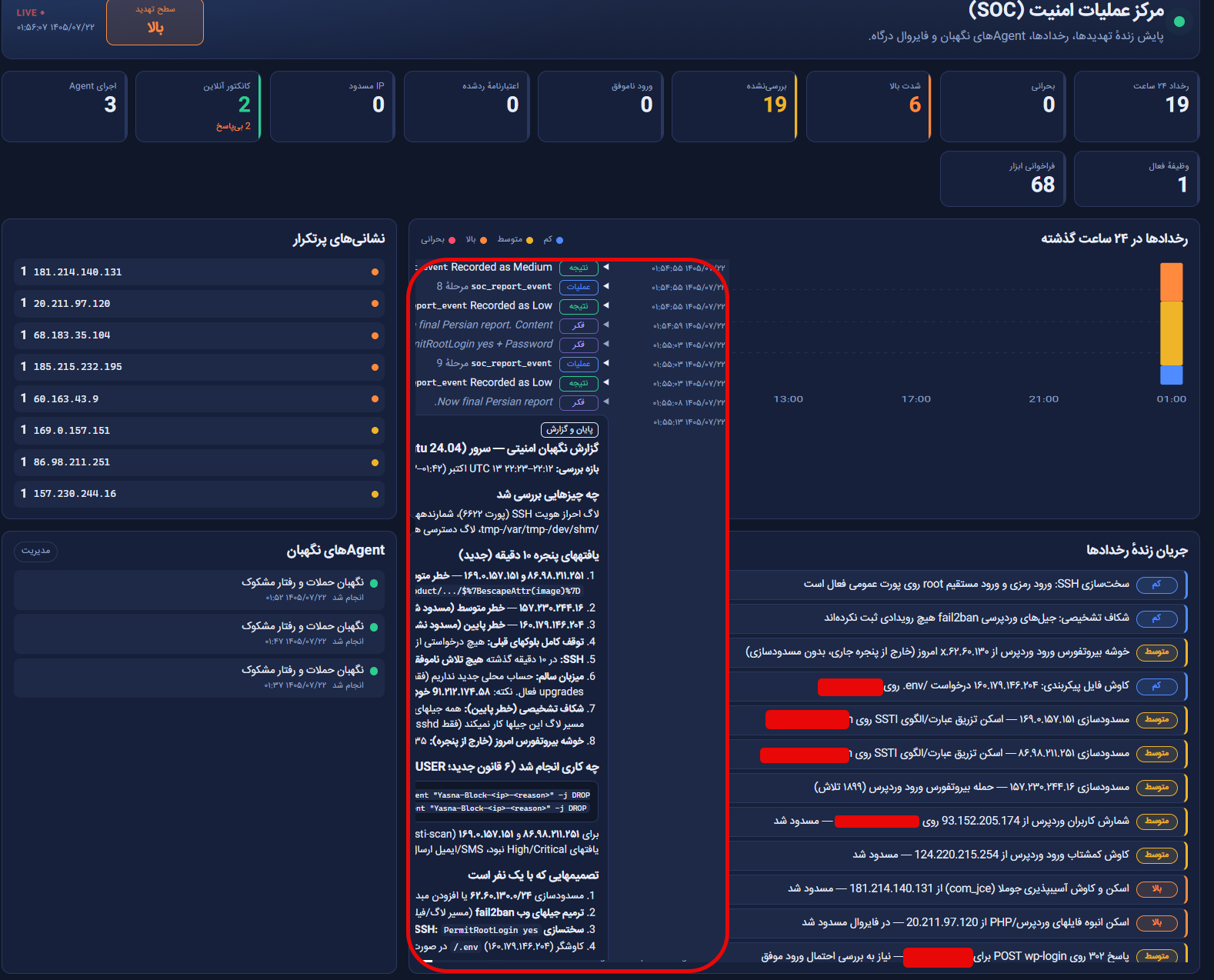
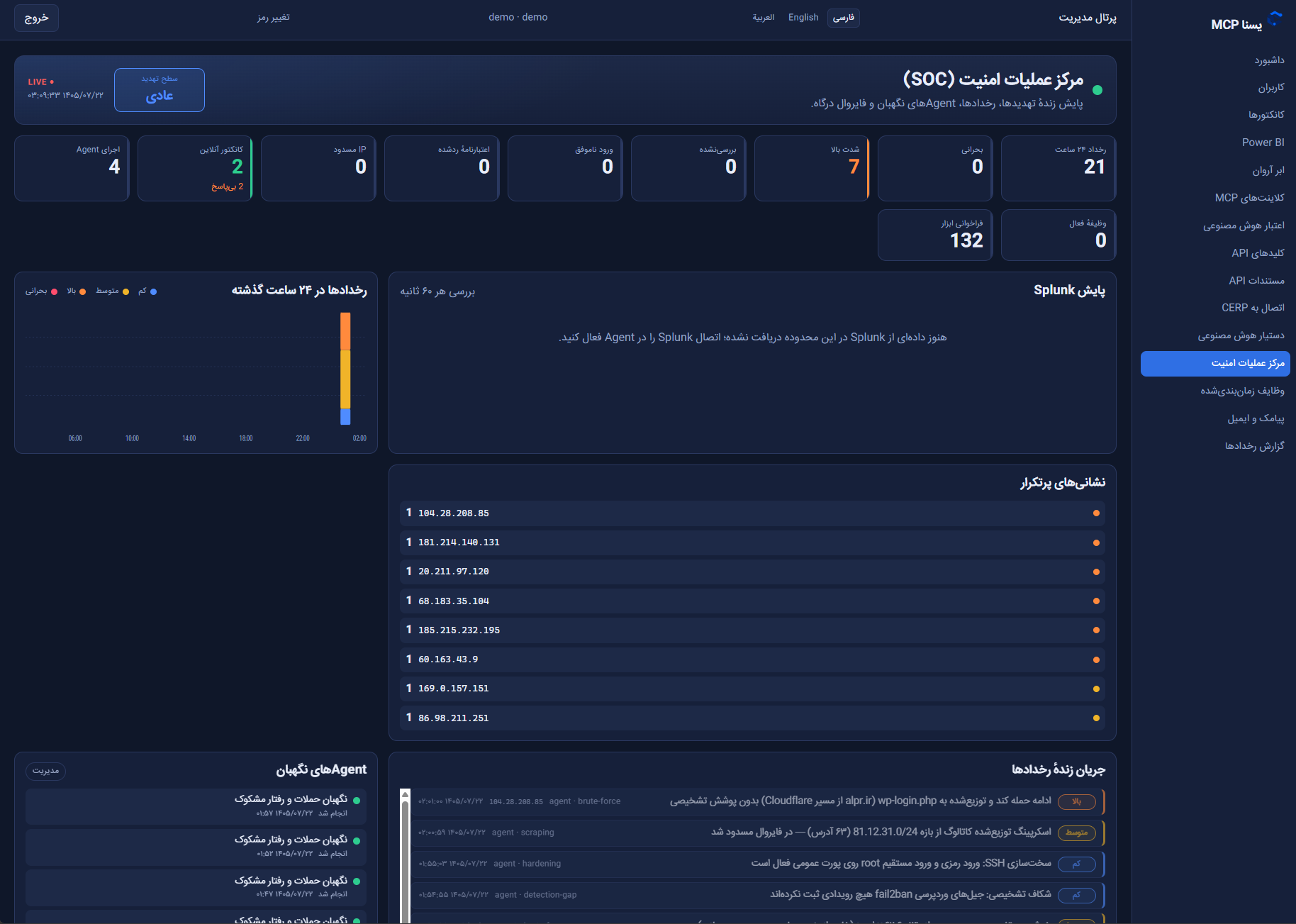
    Actual dashboard views and SOC monitoring examples

    The images below show examples of security operations dashboards, events and notification workflows. Enabled tools and permissions determine which operations can be performed.

    YasnaMCP product screenshot
    YasnaMCP product screenshot
    YasnaMCP product screenshot

    SOC capabilities demonstration video

  • Design and Publish Power BI Reports with AI and YasnaMCP

    Power BI + AI + YasnaMCP

    Design, view and publish Power BI dashboards with AI through YasnaMCP

    In the new YasnaMCP Windows Agent, Power BI is more than a separate reporting tool. A connected AI client can inspect databases, understand their structure, design a Power BI report, view actual Power BI Desktop output, refine it and publish it to Power BI Report Server.

    Current version: This capability has been available since YasnaMCP Windows Agent 1.4.3 and was designed and tested for Power BI Desktop for Report Server and Power BI Report Server.
    AI Client → MCP → YasnaMCP Gateway → Windows Agent → Power BI Desktop → Power BI Report Server

    What actually happens?

    Instead of manually building data models, measures, relationships, visuals, themes and publishing in Power BI Desktop, a user can describe the requirement in natural language. YasnaMCP exposes Power BI tools to the model, and Windows Agent performs the actual operations on the user’s machine.

    • Analyze the database and identify fact tables, dimensions, keys, dates and financial values.
    • Run read-only queries to inspect data before dashboard design.
    • Create reports, tables, columns, relationships and measures.
    • Generate a Jalali calendar and Persian sales measures.
    • Design pages and visuals on a standard 12 × 12 grid with RTL support.
    • Apply ready-made themes for sales, finance, inventory and management dashboards.
    • Open reports in Power BI Desktop, load data and capture page images automatically.
    • Return actual page images to AI so it can review and refine the result.
    • Save the PBIX file and publish directly to Power BI Report Server.

    AI does not just generate a file; it reviews the result

    The design cycle does not stop at file generation. Power BI Desktop actually runs, loads the data, renders the report and captures each page. Images return to the model through MCP, allowing it to decide what needs changing based on what Power BI actually rendered.

    Agentic cycle: Analyze → Author → Render → See → Improve → Render Again → Publish

    Power BI without patching Desktop

    This architecture does not patch Power BI Desktop. YasnaMCP uses documented Power BI formats such as PBIP, TMDL, PBIR, PBIT and Custom Visual Packages. Desktop handles tasks Power BI itself must perform: loading data and rendering reports.

    • The primary YasnaMCP project is stored as yasna-report.json a project document.
    • The same document produces PBIP output containing TMDL and PBIR.
    • A PBIT file is also produced for Power BI Desktop for Report Server.
    • After rendering, the final PBIX is saved and can be published.

    Designed for Iranian workflows: Jalali dates, RTL, rials and tomans

    YasnaMCP includes a design system in the Agent for Persian reporting scenarios, alongside Power BI automation.

    • RTL layout: Because Power BI has no page-wide RTL switch, visuals are positioned using a mirrored grid.
    • Jalali calendar: A Persian date table is generated in DAX, with leap-year logic based on PersianCalendar.
    • Jalali Date Picker: A dedicated custom visual supports selecting a Jalali date, date range or YYYY/MM/DD input.
    • Rials and tomans: Stored and displayed units are separate, and currency measures can apply suitable conversion and labels.
    • Persian fonts: IRANSans FaNum is installed with the Agent to display Persian digits in native visuals.

    Ready-made templates and themes

    AI does not need to design each dashboard without a framework. YasnaMCP provides themes and templates for structured, repeatable output.

    • yasna-light For general light dashboards.
    • yasna-dark For dark management dashboards.
    • yasna-finance For financial reports.
    • yasna-warehouse For inventory reports.
    • Templates: sales-executive, sales-daily, finance-overview and inventory-overview.

    30 Power BI tools available to AI

    The gateway exposes Power BI tools through three separate security scopes, keeping reading, authoring and publishing distinct.

    • powerbi.read: View status, reports, templates, images, database analysis and read-only queries.
    • powerbi.author: Create and edit reports, tables, measures, relationships, pages and visuals, and run rendering.
    • powerbi.publish: Publish to Power BI Report Server.
    Access control: The connector’s database allow-list applies to the database used by the report, preventing access to databases outside the configured scope.

    An example dashboard workflow

    powerbi_status → analyze_database → query_data → create_report → add_table → relationship → measures → Persian Calendar → template → render → inspect image → improve → publish

    The model first checks machine capabilities, analyzes the database, inspects data, creates a report and reviews rendered output. The same report can then be published to Report Server.

    Connecting to Power BI Report Server

    The Agent can discover Report Server on the machine, create the destination folder, upload a PBIX and store data-source credentials on the server. A dedicated Power BI settings tab covers database, Desktop, Report Server, theme, RTL, currency and Jalali range.

    What still requires the user once?

    When Desktop first connects to a database server using SQL authentication, Desktop requests the password. YasnaMCP deliberately does not fill that password dialog for the user. The Agent returns status waiting_for_credentials and an image of the prompt. Once the user enters the password, automation continues. Desktop remembers the credential for later use.

    What was tested in the reported version?

    • Power BI Desktop for Report Server, September 2026 edition.
    • Power BI Report Server on the same machine.
    • Two actual SQL Server databases.
    • Analysis, authoring, validation, rendering, PBIX saving and publishing.
    • Persian layout, Jalali axes, Persian digits, Jalali date picker and actual filtering on Report Server.
    • Storing data-source credentials on Report Server during publication.

    Items not yet reported as verified

    • PBIP output in the cloud edition of Power BI Desktop.
    • Complete rendering with the Agent running only as a Windows Service without a user session.
    • Viewing a published report on a machine without the Agent’s Persian font installed.

    What does this mean for business?

    YasnaMCP makes Power BI usable by an AI agent. A manager or finance user can describe a requirement in natural language, and AI can use controlled data access, a defined design system and an actual render/review cycle to build and publish a dashboard on the organization’s on-premises infrastructure.

    A final scenario: ‘Build a Persian management dashboard from this year’s sales with a Jalali calendar, daily sales, branch comparisons, amounts in tomans and a date-range filter, then publish it to Report Server.’